Clip Arts: A Hand-Drawn Display Font for Makers
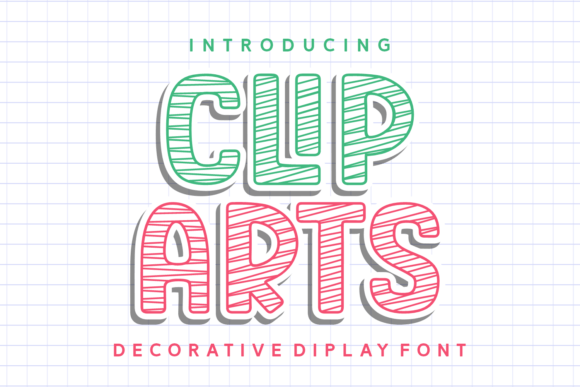
If you create handmade products, you know that the right typeface can make or break a design. Clip Arts is a decorative display font that captures the feel of hand-drawn sketches, bringing a playful and artistic energy to any project. As a maker who sells on Etsy and at craft fairs, I have tested many fonts, and Clip Arts stands out for its ability to add a personal, handcrafted touch without losing readability. This font feels like it was drawn with a pen, not a computer, and that warmth translates directly into your products.
What Makes Clip Arts Stand Out for Handmade Products
Clip Arts is not a rigid, mechanical font. It has a sketch-like quality that makes each letter appear slightly imperfect, like a real hand-drawn illustration. This personality is perfect for crafters who want their products to feel unique and full of character. The font exudes a playful and artistic vibe, which works beautifully for imaginative designs such as children’s party invitations, whimsical wall art, or creative product labels. The hand-drawn aesthetic helps your items stand out in a sea of generic, mass-produced goods. Customers often associate this style with boutique quality and thoughtful design, which can increase perceived value.
Practical Ways to Use Clip Arts in Your Craft Business
Clip Arts is incredibly versatile for physical products and digital downloads. Here are realistic ways to incorporate it into your shop:
- Labels and Stickers: Use Clip Arts for candle labels, jam jar tags, or skincare product stickers. The hand-drawn look adds a homemade feel that customers love.
- Greeting Cards and Invitations: Birthday invitations, thank-you cards, and save-the-dates benefit from the font’s charming, informal style. It works especially well for children’s themes or rustic weddings.
- Wedding Stationery: Pair Clip Arts with a clean serif or sans serif font for place cards, welcome signs, and programs. The sketchy letters add a romantic, handcrafted touch.
- Wall Art and Printables: Create printable wall art for nurseries, kitchens, or farmhouse decor. Short quotes or single words in Clip Arts look fantastic as framed prints.
- Product Packaging and Tags: Boutique clothing tags, gift boxes, and product packaging benefit from the font’s artistic flair. It helps establish a consistent brand identity that feels handmade.
- Mugs, Shirts, and Tote Bags: For heat transfer or screen printing, Clip Arts works well for short phrases or names. Make sure to test readability at smaller sizes, but for display use, it shines.
- Signs and Seasonal Designs: Farmhouse signs, holiday banners, and seasonal craft projects like “Welcome” or “Merry Christmas” look inviting and warm with Clip Arts.
How Clip Arts Elevates Product Presentation and Brand Identity
Your product presentation is the first thing a customer notices. Clip Arts helps you create a cohesive brand image that feels approachable and creative. When you use this font consistently across your labels, packaging, social media graphics, and website, customers begin to recognize your style. This recognition builds trust and loyalty. The hand-drawn nature of Clip Arts also evokes an emotional response—it feels personal, like someone took the time to draw each letter just for you. That emotional appeal is powerful for small shop owners who want to connect with their audience on a deeper level. Whether you are designing a logo for your brand or creating a product tag, Clip Arts adds a layer of authenticity that is hard to replicate with standard fonts.
Best Applications for Clip Arts: Short Phrases, Titles, and Display Use
Clip Arts is a display font, which means it is best used for short text that needs to grab attention. It excels in titles, names, decorative wording, and product labels. For example, a candle label with the word “Vanilla” or a gift tag with “For You” reads beautifully. Wedding welcome boards, baby shower signs, and menu boards all benefit from the font’s charm. However, for longer text blocks, such as product descriptions or ingredient lists, pairing Clip Arts with a simpler font is advisable. The intricate details that make it beautiful can become overwhelming in long paragraphs. Stick to one to three words for maximum impact, especially when cutting with a Cricut or Silhouette machine. For small stickers or labels, test the font size in your design software to ensure letters remain clear and readable.
Readability and Production Tips for Cutting Machines and Printers
When using Clip Arts with cutting machines, there are a few things to keep in mind. The hand-drawn lines may have thin strokes that could be difficult to cut cleanly at very small sizes. For intricate cuts, I recommend using a weeding tool and a light grip mat. Always do a test cut on scrap material before cutting your final product. For printed items like stickers or cards, Clip Arts prints beautifully on most paper types. If you are printing on dark surfaces, consider using a white or light-colored background to ensure the letters stand out. For mockup previews, check how the font looks at different scales—sometimes reducing the size can cause the charming details to blur, so adjust accordingly. The font’s natural irregularity is part of its appeal, but for professional products, you want to maintain clarity.
Font Pairing Ideas to Complement Clip Arts
Pairing Clip Arts with a clean, simple font can create a balanced and professional design. Here are some pairing ideas:
- With a Clean Sans Serif: A font like Montserrat or Open Sans works well for body text, while Clip Arts handles the headline. This pairing is great for product labels and packaging.
- With a Simple Serif: For a more classic or elegant look, pair Clip Arts with a serif font like Playfair Display or Lora. Use this combination for wedding invitations or premium product tags.
- With Another Handwritten Font: If you want a completely handcrafted feel, pair Clip Arts with a softer script font. Make sure they contrast enough to be readable—one for titles, one for subtext.
- With a Bold Display Font: For a fun, eclectic look, use Clip Arts alongside a bold decorative font. This works for children’s products or creative projects where you want to stand out.
When pairing, keep the overall design simple. Let Clip Arts be the star, and use the second font to support it without competing.
What to Check Before You Download: Styles, Alternates, and File Formats
Before purchasing Clip Arts, review the product details carefully. Some decorative fonts include multiple styles, such as regular, bold, or outline versions. Check if the font comes with ligatures, alternates, or swashes—these extras can add variety to your designs and make them look more custom. File formats like OTF (OpenType) and TTF (TrueType) are standard and work with most design software, including Adobe Illustrator, Photoshop, Canva, and Cricut Design Space. Multilingual support is also worth checking if you create products for international customers. While Clip Arts is described as a decorative display font, confirming these details ensures it fits your specific workflow.
Commercial Licensing: Selling Products Made with Clip Arts
If you plan to sell physical products or digital downloads featuring Clip Arts, you need to understand the font’s commercial licensing. Most premium fonts, including Clip Arts, are sold with a standard license that covers physical products like stickers, mugs, shirts, and packaging. However, if you intend to sell digital templates, printables, or SVG designs where the font is embedded, you may need an extended license. The same applies if you are creating merchandise for clients or using the font in a logo for a business. Always read the license terms provided by the seller. A good practice is to contact the font creator if you are unsure about your specific use case. Investing in the correct license protects your business and respects the designer’s work.
Clip Arts is a versatile, charming font that can elevate your handmade products and help you build a recognizable brand. Its hand-drawn feel adds a personal touch that customers appreciate, whether they are buying a candle, a greeting card, or a custom t-shirt. By using it thoughtfully in short phrases, pairing it with complementary fonts, and following production best practices, you can create beautiful, professional-looking items that sell. Give Clip Arts a try in your next project, and see how a single typeface can transform your craft business.